

Modifications and Upgrades for Anycubic Vyper
Contents
Modifications and Upgrades for Anycubic Vyper
Attention! Check the revision of Anycubic Vyper printer that made the modification. Different revisions of Anycubic Vyper printer have some different parts!

Direct drive extruder for Anycubic Vyper
- Anycubic Vyper direct extruder by AndyO7
- Vyper Direct Drive by dlooper311
- Anycubic Vyper Direc drive by nosto15 (has some strange objects inside model)
- AnyCubic Vyper 2021 year Direct Extruder Upgrade by RusVyper
- Anycubic Vyper direct drive by ivan_lisi
- Anycubic Vyper Direct Drive Remix by markytemp
- Vyper Direct Drive RemixV8 by Rickyfly
- Anycubic Vyper with V-DRAGON + ORBITER
- True DIRECT DRIVE EXTRUDER FOR ANYCUBIC VYPER by DU_AL (has some problem with gauge sensor)
- Trianglelab(Genuine Authorized) Orbiter Extruder V1.5 Full Version With MOTOR
- trianglelab V6 M12 Threaded Heatsink for v6 hotend Remote OR Short range 1.75MM for Feeding 3D printer extruder
- trianglelab NEW high quality GRADE5 V6 titanium alloy heat break for V6 HOTEND heater block 1.75MM Filament Smooth
- Mellow Exclusive Sunon 3D Printer Blower Fan 5015 24V 0.41A Double Bearing Fan Centrifugal DC Cooling Turbo Fan 5015S
Nozzle for Anycubic Vyper

- Trianglelab 1PC Top Quality Brass Volcano Nozzle For 3D Printers Hotend For Volcano Hotend M6 Extruder Nozzle
- Trianglelab 1PCS Hardened Steel Volcano Nozzles For High Temperature 3D Printing PEI PEEK OR Carbon Fiber Filament For Volcano Hotend
Heatbreaks for Anycubic Vyper

Two kinds of metals are used to make the throat tube. Titanium is used in the front part of M6 to reduce thermal conductivity, while copper is used in the back part of M7 to help heat dissipation. The thermal barrier performance is better than that of the original V6 and the printing quality is improved.
Because the original heatbreak uses Teflon tubes, the gap in the middle position is too long, so when making all metal, it is necessary to reduce the middle distance, which will cause part of the copper to be exposed to the air, so we use a tapered design to effectively conduct heat At the same time, it will also reduce the heat in the middle position, so that the heatbreak of this structure can play the best effect.
- Size: heat end – M6, heating end – M6
- Total length: 6mm
- Use for: 1.75mm
- Material: Copper & Titanium
Can have some problems with PLA, PETG.
Some untested links to Aliexpress:
- Trianglelab ANYCUBIC Vyper Titanium Alloy Bi-Metal Heatbreaker For ANYCUBIC Vyper 1.75mm
- Mellow All-Metal NF TArazy Heat Break Bi-Metal Titanium Copper Throat For ANYCUBIC Vyper 1.75mm
Autoleveling sensors and other components for the Anycubic Vyper
- Anycubic Vyper DMS Strain gauge V1 by AracAttack
- EB resistive strain gauge full bridge strain gauge 1000ohm 350 ohm pressure and weight / load cell
- Anycubic Vyper BL Touch Connect Box by chefe82
- Anycubic Vyper BL Touch Mount by cryd
- Anycubic Vyper extended – Klicky Probe
- Anycubic Vyper BL Touch Mount
- Anycubic Vyper Leveling – component for forked light barrier
Hot ends for Anycubic Vyper
- REVO Six (E3D) Upgrade for my modular Printheat on Anycubic Vyper by stenmic
- Anycubic Vyper – Adapter for V6 (E3D) by RyanMaverick (Phaetus Dragonfly BMO AllMetal)
- Anycubic Vyper V6 Vise Mount by markytemp
- Anycubic Vyper V6 Block Conversion by hobie2987
- Anycubic Vyper Dragon Hotend mod
- Phaetus Rapido Adapter für Anycubic Vyper by Martuk

Blowing of creating prints
- Wide deflectors Anycubic Vyper printhead Stock fans!
- Anycubic Vyper Dual 5015 V2 Rev2 by DerLatzer
- Anycubic Vyper 5015 cooler (Hero Me 5 duct) by JBDoge
- Anycubic Vyper / Custom Print Head with 2×5015 Fans by kiteboarder1980
- Modular Print head for different fans on Anycubic Vyper by stenmic
- Hero Me Gen6 Master Suite – Extruder/Hotend cooling system by mediaman . Don’t buy docs from author bcs it’s not describe how build this mod.
- Mellow Exclusive Sunon 3D Printer Blower Fan 5015 24V 0.41A Double Bearing Fan Centrifugal DC Cooling Turbo Fan 5015S
- Anycubic Vyper Fan Duct by hobie2987
- Wide deflectors Anycubic Vyper printhead Florent Duret
- Anycubic Kobra Max/Vyper Printhead/Gantry Quiet Cover by jmperou
- Cooling air duct Voron modified version By Anycubic Vyper (4020 turbofan)
- Cooling air duct Voron modified version By Anycubic Vyper(5015 turbofan)
- Anycubic Vyper Voron Stealthburner Clockwork 2 adapter Resset
- Vyper Voron – StealthBurner by Scero. Highly not recommended bcs it has very overpriced coonection board for $30. You can buy powerful Bigthreetech’s board for this price.
- True DIRECT DRIVE EXTRUDER FOR ANYCUBIC VYPER by DU_AL (has some problem with gauge sensor)
PTFE tube with 1.9 mm inner diameter and tube holders
Reduces retraction amount
- Trianglelab PTFE Tube Bowden Extruder (Black, Blue, Red)
- Blue PTFE Tube
- Anycubic Vyper PTFE stabilizer bracket by JBDoge
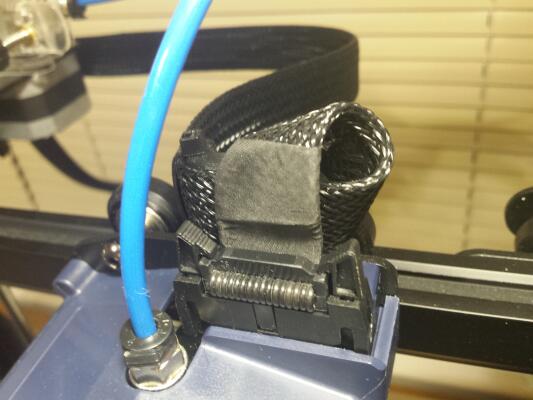
Clips for holding the filament feed tube to the printhead ribbon cable
- For Anycubic Vyper revision C: https://www.thingiverse.com/thing:5146943
- For Anycubic Vyper revision A: https://www.thingiverse.com/thing:4927988
- Anycubic Vyper / Cable, Bowden Mount V1 by kiteboarder1980
- Anycubic Vyper PTFE stabilizer bracket (V1 Version of Vyper) by Skley
Lightweigth cable management for Anycubic Vyper cables
Chains and guides for Anycubic Vyper cables and PTFE tube
- C revision: Anycubic Vyper V2 Kabelschlepp (Chainlink) by UncleSash
- A revision: https://www.thingiverse.com/thing:4935924
- https://cults3d.com/en/3d-model/tool/anycubic-vyper-chainlink
- Anycubic Vyper PTFE stabilizer bracket by JBDoge
- Anycubic Vyper Cable Bowden Clip by Wingman_0257
Belt tensioners for Anycubic Vyper
For X axis:

- Vyper Riemenspanner Y-Achse by stenmic (uses stock components)
- AnyCubic X-axis Tensioner by RusVyper
- Anycubic Vyper X-Achse Verstellung by HappyUser20
For Y axis:

- Vyper Riemenspanner Y-Achse by stenmic (uses stock components)
- Vyper Riemenspanner Y-Achse (alte Version) by stenmic
- AnyCubic Y-axis Tensioner by RusVyper
- ANYCUBIC VYPER Y-AXIS TENSIONER (STABLE VERSION)
- Anycubic Vyper Y-Achse Verstellung by HappyUser20
Belt for Anycubic Vyper
Anycubic Vyper replacement for axis motor mount
- Reinforced holder for Y-Stepper on Anycubic Vyper by stenmic
- Anycubic Vyper replacement Y axis motor mount by chronos78 I couldn’t install it on my printer.
- Anycubic Vyper Y axis motor mount by Soberman (for longer motors)
Frame mods for Anycubic Vyper
- Z-axis stabilization for Anycubic Vyper by stenmic I recommend print it with more then 70% infill and use 10 or 12 mm tube.
- Z brace frame support CR6 ender 3 Vyper CR10 adapter for lead screw or bars by Persano
Anycubic Vyper Adjustable Z-Endstop
- Anycubic Vyper Adjustable Z-Endstop Remix (thicker) Aircoholic
- Adjustable Anycubic Vyper Endstop Trigger Einlander
- Anycubic Vyper Leveling – component for forked light barrier 3D-Muc
Rails mods for Anycubic Vyper
- Anycubic Vyper simple Y-axis MGN15 rail modification by USG
- Anycubic Vyper / X-axis Linear Rail, MGN12H by kiteboarder1980
- Anycubic Vyper / Y-axis Linear Rail, MGN12H by kiteboarder1980
- Anycubic Vyper MGN12H Y-axis Linear Rail kit Resset
- Untested ready rails mod kit for Anycubic Vyper from Aliexpress
Anycubic Vyper sensor holder and filament guides
- Anycubic Vyper 45 degree filament runout bracket by JBDoge
- Filament Guider mit Kugellager Anycubic Vyper by Finest1989
- Vyper filament sensor bearing mount by Ashleyspop9301
- 45° Adapter for Micro Swiss Extruder on Anycubic Vyper by Teenietuss
- Anycubic Vyper filament sensor holder by Mcpea1477
- Anycubic Vyper Filament Sensor Holder (PTFE-Input)
- 45° Adapter for Anycubic Vyper Filament Sensor
- Anycubic Vyper/Kobra_MAX/Plus 45D Filament Sensor Mount by computerguru79
- Anycubic Vyper 90 degree horizontal filament sensor mount by RowanDickerson
Anycubic Vyper Z-axis wobble and noise fixes
- https://www.thingiverse.com/thing:4851975
- https://www.thingiverse.com/thing:4920823
- https://www.thingiverse.com/thing:5171542
- Spring-loaded bearing for the Z-spindle on Anycubic Vyper by stenmic
- Compensation Disc for Z Axis T8 Anti Check Nut on Anycubic Vyper by stenmic
- You can also put some foam in here:

Anycubic Vyper toolbox organizer
- Vyper tool box by masket31600
- https://www.thingiverse.com/thing:4909034
- https://www.thingiverse.com/thing:4917738
- https://www.thingiverse.com/thing:4970515
- https://www.thingiverse.com/thing:4966317
- https://www.thingiverse.com/thing:5144093
- Anycubic Vyper drawer inlay with compartment by A_Leh
- Anycubic Vyper Tool organizer by Lonny_03
- Anycubic Vyper Tool Box – Remix by jodecy
- Vyper Drawer/ Tool organizer by JackyHe398
Fillers in Anycubic Vyper frame channels
- https://www.thingiverse.com/thing:4910654
- https://www.thingiverse.com/thing:4947097
- https://www.thingiverse.com/thing:4984160
- Anycubic Vyper Belt Tensioner covers by Vaporus
Cases for Anycubic Vyper
- Anycubic Vyper Screen Case by Ashleyspop9301
- Anycubic vyper x gantry cover by Ashleyspop9301
- Anycubic Vyper Cover fürs Display by stenmic
Feet for Anycubic Vyper
Anycubic Vyper filament holder
- Vyper Filamentlager by stenmic
- Anycubic Vyper Filament Spool Holder with Bearings
- Filler – The Customizable Filament Holder that fills your printer! by HugoHuge
- Anycubic Vyper Filamet Halter klein / Holder littel by Martinnw
- Anycubic Vyper Spool Holder with Bearings by firebirdrc
- Anycubic Vyper Filament holder 80mm spools by Enzi1984
- Anycubic Vyper Filament holder 50-80mm spools – easy print! by firebirdrc
- Filament holder for Anycubic Vyper by lonelyFox
- Anycubic Vyper Pop In Top Mount Spool Holder by YouVee
- Anycubic Vyper – Spoolholder Mount by Kamerov
- Anycubic Vyper Simple Top Mount Spool Holder – Taller by ButterUrBiscuit
- Anycubic Vyper Filament Holder by taka0909
- Mega Anti-Tangle Spool Holder by graham01
- Anycubic Vyper Spool Holder with Bearings by I_Love_LEGO
- Secure Anycubic Vyper Filament Holder With 608 Bearings Roller by mandrewlin
- Long filament holder for anycubic vyper by ajatrix
- Anycubic Vyper Filament Spool Holder with Bearings
- Long filament holder for anycubic vyper by ajatrix
- Anycubic Vyper Filament Top Rail Mount by padrino73
Anycubic Vyper filament sensor holder
- Anycubic Vyper / Filament Sensor, Cable Holder, Bearing 608 by kiteboarder1980
- Anycubic Vyper Stronger 45 Degree Filament Sensor Mount by ButterUrBiscuit
- AnyCubic Vyper 2021/2022 Filament Sensor Bowden Adapter by ckarcz
- Anycubic Vyper Direct Filament Sensor Holder by taka0909
- Anycubic Vyper Filament Sensor Guide 45 degree left by elministerr
- Anycubic Vyper 90 degree horizontal filament sensor mount by RowanDickerson
Anycubic Vyper filament guide
- Anycubic Vyper / Filament Bearing Holder for Mirco Swiss Extruder by kiteboarder1980
- Anycubic Vyper Filament Guide 2 by padrino73
- Top PTFE Guide for 2020 Extrusion Markytemp
Mounts for Anycubic Vyper screen
- Anycubic Vyper Display Swivel Mount v2 by seanss
- Anycubic Vyper Print-In-One Display cover by Lonny_03
- Anycubic Vyper Touchscreen Slider Case by eastrd
- Anycubic Vyper Screen Case by Ashleyspop9301
- Display case for Anycubic Vyper by stenmic
- Anycubic Vyper – Screen Cover by Hanguk
- Anycubic Vyper Touchscreen Slider Case
For Anycubic Vyper printing bed
- Bed Handle by kiteboarder1980
- Anycubic Vyper Part Pusher Arm by benheck
- Anycubic Vyper Platform Guide(Improved) by JackyHe398
- Spacer for belt on the print carriage on Anycubic Vyper by stenmic
- Any Cubic Vyper with Go Pro mount MarcL
Lighting for Anycubic Vyper
Cooling Anycubic Vyper motherboard and power supply
- Anycubic Vyper Fan upgrade by RiRuKa
- Anycubic Vyper Mainboardlüfterplatte für Noctua 80x80x25 by mcshorty2811
- Anycubic Vyper Bodenplatten Mainboard + Netzteil Lüfter 92x14mm 12V by Motte76
- Anycubic Vyper Silent 120mm Fanmod by Beardtallica
- Anicubic Vyper – Power Supply cover for 92x14mm Noctua fan by fredbirne
- Anicubic Vyper – Mainboard cover for 92x14mm Noctua fan by fredbirne
- Anycubic Vyper 80mm Fanmod by Bartalomeus
- Anycubic Vyper mode with 2 80mm Noctua fan by Bartalomeus
- Anycubic Vyper 92x14mm fan and OctoPi upgrade by SkyBeam
- Anycubic Vyper bottom by Bartalomeus
Mods for using Raspberry Pi with Anycubic Vyper
- Raspberry Pi Zero 2W Klipper Case for Vyperby Koeniglich
- Anycubic Vyper Raspberry 4b (+3b) housing with camera attachment by A_Leh
- Anycubic Vyper – Raspberry Pi 4B holder with Pi Camera mount – attached to printer using v-slots – no screws needed – support for 30mm 5v fan in pi case by Zlayze
- Anycubic Vyper Raspberry 4b housing with Pi HQ cam mount by Phlurblepoot
- Anycubic Vyper Raspberry Mount by dadonali
- Embedding Raspberry Pi into Anycubic Vyper body: Vyper Pi/switch mount in drawer location by Ashleyspop9301

- Raspberry 3 Box Anycubic Vyper by HappyUser20
- Anycubic Vyper with Octoprint Raspberry PI 4-Miuzei 4″ touch screen holder by asaerong
- Anycubic Vyper Rasberry Pi Camera Bracket by SignsEHT
- Anycubic Vyper Raspberry Pi Cam table Holder by vzobster
- Pi Zero 2 W case and mount to end of X axis arm for Vyper by Pat
- Raspberry Pi Zero 2W Klipper Case for Vyper with Header by FDMBRO
- Raspberry Pi Zero and Camera Tripod Mount by Laurelinwen
Anycubic Vyper main board mods
- Hardware mod to enable UART for TMC2209

I am using firmware v6.1e. x-axis steps/mm are set to 60. The head does not go to the right edge of the print is about 20 mm (the traveled path is reported as 250mm). When I set steps/mm 80 it does, but then the print is not correct, the figures are stretched out.
I use UltiMaker Cura 5.7.1.
Put again steps/mm 80 began to print normally, but when you press stop printing it parks the head more backwards than it should ignoring the button, scrolls the belt.
Hello
If you have stock hardware use firmwares with stock values.
HI, I retracted from 6.2.2 to 6.1E as I keep getting MINTEMP error messages and cancellations of prints frequently. I couldn’t understand the sequence of steps on the calibration menu. Do I have to level the bed first and then press the Home button? ANd then do the z-offset tuning? Thank you for the clarification.
Hi again, after flashing 6.1E and tuning (z offset, bed levelling, PID, E step etc), I started printing but the printer is throwing temperature exception (yellow screen with a black triangle and exclamation mark) 5 min into printing all the time. Any idea why this is happening? How do I solve this problem? Thank you for your kind guidance on this matter.
Here is the error reported by the OctoPrint while the error appeared. I am not sure if this is because of the firmware or a sudden problem with the hardware. But it started happening only after I flashed the firmware. I did the PID auto tune of both the bed and the nozzle via the OctoPrint Terminal and saved the values. Still, the thermistor error screen is appearing. Any idea how to solve this? Thank you.
Popup: MINTEMP triggered, system stopped! Heater_ID: bed – echo:Err: MINTEMP
Window text:
Recv: ok
Send: N1432 G1 X210.493 Y50.941 E407.90335109
Recv: ok
Send: N1433 G1 X205.719 Y45.939 E408.420895
Recv: ok
Send: N1434 G1 X200.665 Y41.244 E408.93704101
Recv: ok
Send: N1435 G1 X195.353 Y36.872 E409.45189109
Recv: ok
Send: N1436 G1 X189.76 Y32.804 E409.9694485
Recv: ok
Send: N1437 G1 X183.945 Y29.089 E410.48584107
Recv: T:200.00 /200.00 (348.0000) B:60.01 /60.00 (3427.7500) @:59 B@:21
Recv: ok
Send: N1438 G1 X177.918 Y25.73 E411.0021980
Recv: ok
Send: N1439 G1 X171.717 Y22.747 E411.51714109
Recv: Error:MINTEMP triggered, system stopped! Heater_ID: bed
Recv: echo:Err: MINTEMP
Changing monitoring state from “Printing” to “Error”
“Do I have to level the bed first and then press the Home button? ANd then do the z-offset tuning? ”
Hello.
Yes, you should do these calibrations in this order on anycubic vyper. Z-offset can be a little bit different for different filaments.
Hi, Thank you very much for posting 6.1e, I find it much better wth bigger screen and better implementation of z offset tuning. However, I found 6.2.2 elsewhere, is it latest from 6.1e? I am unable to figure which one is latest, though dates are written, 6.2.2 looks much similar to 6.1a/b/c than 6.1e, 6.2.2. has input shaping I believe. Kindly let me know which one of these versions are the best and stable or even the latest even if they have branched out etc.
Is there a webpage that compares all these various versions and branches?
Thanks in advance.
Hello
6.2.2 custom firmware for Anycubic Vyper is 2 month in pre-reliese state. It’s on your own risk.
I use more my CoreXY custom printer
Thank you.
Whats about the sources for the 6.1e firmware?
Marlin is under GPL license, so source code MUST be also available.
Working on wiring the printer to a custom board, but confused about heater temperature sensor and “SIG” pin. Is the temp sensor a 2-pin sensor, and what is the “SIG” pin?
Hello.
If you use custom board then you can use Ender 3 carriage and new printhead wo gauge sensor and other things from Vyper.
HELLO EVERYONE. I AM A BEGINNER AND I DON’T KNOW HOW TO SOLVE THE FILAMENT COLOR CHANGE. I UNDERSTAND THAT THE M600 GCODE DOES NOT WORK IN VYPER (ORIGINAL FIRMWARE (2.4.5). TRY WITH PAUSE AT HEIGHT, CHANGE FILAMENT). I ONLY CAN GET IT TO STOP FOR NO MORE THAN 180 SECOND AND THEN IT STARTS ALONE (WITH REPRAP M226 METHOD). IF I AM NEXT TO THE PRINTER I CAN DO IT, BUT IF I WANTED TO BE ELSEWHERE AND TIME GOES UP, IT STARTS ALONE. THE SCREEN DOES NOT GIVE ME ANY RESET BUTTON. ALSO WITH FILAMENT CHANGE. YOU SURELY KNOW MUCH MORE, I APPRECIATE YOUR HELP. GOOGLIE YOU HAVE TO INSTALL ANOTHER FIRMWARE… IS THIS SO? THANK YOU
Thank you for posting firmware files. Would you please compile and post a version that has the max temperature raised to 300c. I am looking to print NylonCF and having a higher temperature is the last hurdle I am facing. Thanks.
And yes I have an upgraded hotend, bi metal heat break, capricorn tubing, hardened steel tip, and setup the extruder to be mounted on the print head. Just looking to get 290 – 300C printing temperature.
Hello.
You can order such firmware from author of this firmware. I’m not author.
Pavel,
For CE 6.1e + TE, is hybrid threshold enabled? If so what is the hybrid threshold set to for X Y Z & E?
Hi Pasha,
I have a NTC error on my Vyper which turns out that I have a faulty motherboard(informed by anycubic).
I have ordered a replacement, however rather than throw this way, I would rather see if it is worth repairing it.
Would you have any tips or ideas on the possible cause, for example could it be a stepper motor issue?
Look forward to hearing from you.
Kindest regards
Mark
Hello
Contact repair engineers.
Hmmm NTC is negative temperature coefficient element, why you decided that motherboard is bad? ir may be thermistor itself…. its in printing head, attached with one screw. Stepper motors is no where near troubleshooting your problem. If you see very low temperature, its because of thermistor.
Awesome Firmware, but how can i get above 260c?
Hi
You need to change heatbreak to all metal even for 250
OMG, thank you for this awesome Firmware. My Vyper was unuseable before. I couldnt print above 200° (i think my vyper has shown wrong Temp). I think when my Vyper has shown 200° it was more like 250°. I have used Prontaface to do PID tuning but nithing helped. With your Firmwar, PID Tuning and i can print PLA now with 200° and the print are awesome. You are my Hero💪💪 thank you
Just a quick question should I adjust the Z end stops for the non-N version as well, or can I leave it stock?
Hi guys,
i there any chance to read the bed level sensor while printing to detect jams?
I would like to check this sensor permantly via Octoprint to send a push message if the sensor is detecting an object onger than 1min.
I could solder a extra wire to the LED of the extruder pcb but there must be a way that grab the sensor signal between the extruder pcb and the main board.
Does anybody know how this signal is transfered to the mainboard?
BR Steffen
*Is there …
Hey Guys,
Having a weird issue myself, when trying to auto level the printer completes all point except the last 4 on the righthand side. After which I am unable to manually edit any of the values within the boxes. They default to “” on their own, and are unchangable. This was witnessed both in the LA+7 and LA+N+7 firmware versions, where also in the +N variant my printer would increase it’s Z axis while using both motors. It would then fail the leveling process all together. Unsure of what could be causing this issue
As a side note, printer functions fine with 6.1b firmware. Only have these issues with the version 6.1e files, all of which do not function properly on my device.
The source code would be great :)
Hi, I seem to have the same problem on version 6.1e as Tobias (LA or LA+7). I do everything according to the instructions, after installing the firmware I try to calibrate the table. I start the calibration, and after about 40 points (it always seems to be different), it goes home and a yellow “adjust z-offset” message appears. I’m using 4mm glass instead of a regular surface, my calibration values vary between 2.7-2.8. I don’t understand what to do next, am I doing something wrong or is this a bug? Tried to install version 6.1d, calibration goes without any problems.
The firmware looks great, but this problem has me stumped :(
I have the same problem. Any solution?
FYI if you have any problems with not working touchscreen after display firmware upgrade follow this calibration manual, in my case it works as a charm
https://www.reddit.com/r/anycubic/comments/vapmec/comment/iq5xliw/?utm_source=share&utm_medium=web2x&context=3
Thank you.
But -personally- my Touch is working like charme.
I have no possibility to Bed level. Do you have any idea about this?
Hey Pavel
Are you planning to update for a new marlin 2.1.x to use new feature Input Shaping ?
It will speed up prints :)
Hello
I’m not a developer of this firmware and don’t provide support for it.
Vyper’s community don’t donate to anybody (developers, modelers of mods, etc). So developers can spend time on more profitable things for them.
Hey there,
I am glad to have the opportunity to get the cfw in it’s newest version, but I have a huge problem with the bed leveling. If I install the 6.1.e LA+7, it will not Level at all. It goes to the first point, homes, tells me to set z offset. After I did, the same happens again. If I install the LA+N+7 it drives to the middle of the bed, but instead of probing, z is moving upwards with unsynchronized motors.
Any ideas? I’ll be glad to get help.
Hello
I don’t have problems. Read manuals inside the firmware archive.
Hi! I have the same problem, did you find any solution?
Hey Pavel,
I’m currently swapping the Original Printhead of the Vyper for the Voron Stealthburner. Your Site has really helped me in learning about the printer and thus I have successfully connected the Printer to the “Voron Hartk-Printhead-PCB” (No need for the uber Expensive one from Cryd). The Connection Process is actually pretty easy and should be replicable by anyone with basic tools. I have also adapted the Stealthburner Printhead to be usable with the E3D-V5-Style (Vyper Original) Hotend.
As a Replacement for the Straingauge I used a Pinda-Probe, because I had one laying around and they have been pretty reliable so far. Only Problem now is, its an NC-Style-Probe and because of that I have to edit the Firmware. Is there any way for you to give access to the Source Code of the CF 6.1e Firmware, as it’s impossible for me to edit the Bin Files you have presented.
Thanks for everything so far.
Pedda
Hello
https://github.com/Pmatsol58/VyperCE6.1
Stealthburner isn’t very good choice. Very heavy and weak cooling.
I will build Voron trident and I want buy frame of Ender 3, build custom Ender (bltouch, bigtreetech octopus, etc) and sell Anycubic Vyper. I don’t know how to adapt Ender 3 carriage and Bltouch for Anycubic Vyper in marlin.
Tried on my new Vyper.. updated new screen but touchscreen is non-functional
Hello.
Read about Screen_Reset.zip in README.txt.
I hadn’t such problem with any version of this firmware for Anycubic Vyper.
hallo ich habe auch so ein problem mein display bleibt einfach schwarz gibt es dafür eine lösung ?
Pavel, the Community Firmware is fantastic! It has made my Vyper usable again. I had become very frustrated with the constant levelling and resetting of the z-offset. The firmware fixed that issue and added many needed additions as well. Please stay safe!
Thank you.
I found some bug i version E with temperature during autoleveling. Reported to developer.
What kind of bug is it? Can you describe it
What’s the difference between all the main Board files in?https://pasha4ur.org.ua/downloads/for-articles/anycubic_vyper/custom_firmwares/Firmware_VyperCE_v61e.zip
Not sure what one to use.
Thank you.
It’s in the readme.
main_board_Vyper-CE-6.1xx.bin – standard version.
…(LA) – +LinearAdvance & junction deviation (Recommended).
…(+7) – +Calibration of the table by 7×7 (49) points.
…(+N) – +Parking by nozzle sensor (description at the end of this file).
…(+TE) – +For motors X,Y,Z1,Z2 and E connected via UART (requires motherboard hardware modification!).
…Di – All the same, but only for the Direct extruder.
Hi,
I am really pleased to see people are continuing to update the firmware and display code and improve the Vyper experience, it is nice to see my time was not wasted in developing the CF code for the Vyper. I like the look of the 6.1e release and shall download it to check it out.
Thank you Pavel for keeping the site going and updated.
Hello.
Thanks for the firmware for Anycubic Vyper.
One big problem is that wiper boards fail very often. Like the auto level sensor. It is a pity that there are no instructions on how to put bltouch sensor in marlin.
Hello.
Added Community Edition v6.1e firmware for Anycubic Vyper v0.0.6 with many new features.
Is there a guide for installing this firmware? I’m excited to try it especially if it fixes the z-offset issues!
Hello.
It’s inside archive with firmware.
Thanks! Is there a need to calibrate the touch screen? I’ve seen posts elsewhere that people have has problems with that step but I don’t see it in the instructions.
Hello,
Is it possible to get source code for v6.1e ?
Hello.
https://github.com/Pmatsol58/VyperCE6.1
can you advise me how to compile it, it keeps throwing me a compilation error, thank you I use platformio
What’s the difference between all the main Board files in?https://pasha4ur.org.ua/downloads/for-articles/anycubic_vyper/custom_firmwares/Firmware_VyperCE_v61e.zip
Not sure what one to use.
Thank you.
Hello.
Read README.TXT
Hey, is it possible to get the config+ config h or the hole source code?
6.1c firmware link – 404 error
Hello.
Don’t use C. It’s bugged.
Anyone try using the header on the board for addressable LED lighting?
Hi, My layer fan is not reacting to gcode at all, nor from the ui fan off. Do you know what should be the problem?
Hi.
Update firmware of you Anycubic Vyper.
Hello There,
Thank you for the fantastic work on this! I’ve installed the 6.1d display and motherboard drivers. I’ve run into a bit of an unusual challenge that I’m having difficulty figuring out.
When I choose to auto-level, the nice screen comes up with the 16 quadrants, but it just hangs. I’ve reinstalled the firmware, restarted the machine, and repeated. However, I can’t quite figure it out. The longes I’ve let it wait is 25 minutes.
Any thoughts?
Hello.
Reinstall firmware with all erasing as in manual.
Hey there,
Just wanted to say that I love the detailed specs and mod suggestions you give. I don’t have a question about the tech stuff. I think all your readers would like to know that you and yours are safe and sound out there. Thank you for maintaining this blog, and answering questions. Please stay safe.
Hello. Thank you.
Hi, i like ur post so much. But… haha
I need schematic of trigorilla motherboard, because i have a problem with the thermistor. It doesn’t work normaly, it’s connected very well, but says on the screen like it doesn’t. I have measure the resistance between thermistor pins on the board and it have 36ohm, i think something wrong it’s not ok haha. I have probe change it, and it work same.
Hello
Anycubic doesn’t want to share it. I asked many times.
This is a very common problem. Most times people fix by replacing:
– hotend (problem with thermistor, etc);
– printhead board (short circuit);
– main motherboard (dead circuit on it).
I have the same issue with my board… the resistance between the pins is 37.3 ohms… This does not make sense… Also I measure 0 Vdc between the pins and between either pin and ground… there should be a voltage there because the typical circuit to read a thermistor puts the thermistor in series with a known resistor value and the output is measured at the junction between the resistors… the output is passed to an A/D input on the microcontroller… the Anycubic wiki describes this voltage as 3.3 Vdc for the Kobra 2 printer thermistor, so I am assuming that there should be 3.3 Vdc available for the thermistor circuit on the Vyper board… does anyone know if there is a 3 Vdc step-down circuit on the main board? maybe that is what is bad…
Hi,
I have to say your blog and the community firmware are awesome.
I bought the vyper as a second printer and noticed that even with perfect tuning the outer walls on prints are not quite as smooth as prints from my ender 3 with a new motherboard.
Could the Hardware mod maybe fix that ?
thank you for all your work !
Hello.
Thank you. Here is also link for donations if you want: https://pasha4ur.org.ua/donation 😉
Are you talking about ripples on outer wall?
I and the users with whom I communicate have not been able to overcome this problem.
I changed belts (gates), wheels, wheel bearings, belt tensioners, power supply (Mean Well), toothed pulleys. Reduced acceleration and jerks in the firmware. I also made a mod to stabilize the Z axis.
Nothing helped.
I know people who put a custom board on the viper, but the problem remained. Perhaps the problem is the flexible attachment of the hot part of the head or the motors.
I will also try to change the printhead, shafts on the Z-axes and anti-vibration nuts for new warranty parts.
Perhaps I will assemble a self-assembly 3D printer and sell this 3D printer.
yeah those ripples that only show one or two times in the print but are fairly obvious.
I also noticed that at low speeds, turning linear advance off makes outer walls a lot smoother.
You are probably right about the printhead being a little too flexible, which could be the cause of this problem.
Thank you for the reply, I will definetly make a little donation. :)
I’ve been banging my head about the ripples, but I believe I found a solution I just don’t understand why.
I went into Cura and took a Creality Profile and modified the machine settings to match the default Vyper.
Then I have no ripples. I’ve tried to match the profile settings using Vyper machine profile, but no matter what I do, they won’t go away.
Hi, love your blog and the community firmware. It’s so insanely good compared to the absolute barebone that is the stock firmware.
I downloaded the 6.1c zipfile but it appears to contain the 6.1b firmware. Is it just the name in the zip that is 6.1b or is it actually the 6.1b firmware and not 6.1c?
Thanks again!
Never mind – it’s the 6.1C version :) I didn’t read the datestamps in the file before I posted my question, sorry!
wheres the link/download page?
Hello.
Here: https://pasha4ur.org.ua/articles/anycubic-vyper-overviews-guides-adjustments-settings-tips-modifications-upgrades-and-custom-firmwares/8
Hello.
I uploaded a new archive of this custom firmware with various options. I will make other changes to the article soon.
Sorry for taking so long to answer. My city is under fire from Russian missiles and bombs. I often have to be in a shelter where there is no computer to work with.
You can also support this blog with donations: https://pasha4ur.org.ua/donation
Stay safe brother! We are sending what we can help out everyone there.
Most of the inhabitants of the shelled cities do not receive any assistance. We spend our money on more expensive products. Transport is not working. (
Anyway to enable bed mesh, right it dose not seem to return one to unified bed mesh octoprint (which is just Marlin guide commands).
Hi
There is a plugin for Octoprint for displaying mesh. I don’t use it.
Bed Visualizer
Thank you very much for the blogger’s evaluation of DWIN. I am the sales manager of DWIN. If you need it, you can contact me. My Whatsapp number: +86 15115696647. Email address: [email protected]